Blinking Diodes
|
Here is my gif for assignment 1! It shows all the LEDs blinking individually.

|
Here is my schematic for assignment 1! The schematic shows how my circuit board should be connected.
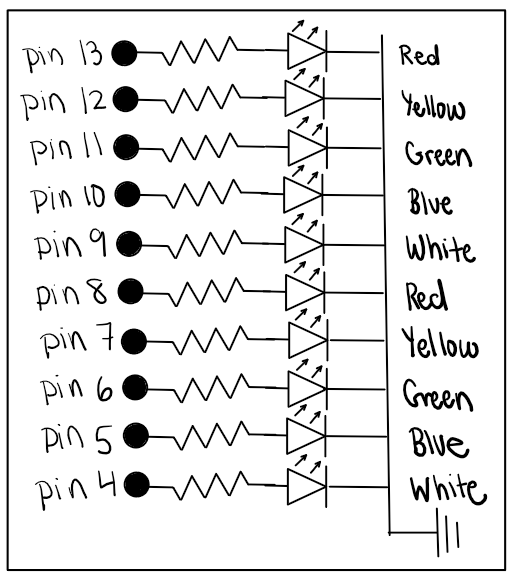
|
Here is my math for how I chose the proper resistance to use. I chose to use 220 ohms of resistance for all the LED lights because that is higher than the minimum resistance required.

|
This is the code I used to make my LEDs on my arduino blink!
void setup() {
// this setup code only runs once
pinMode(13, OUTPUT); // this code initializes pin 13
pinMode(12, OUTPUT); // this code initializes pin 12
pinMode(11, OUTPUT); // this code initializes pin 11
pinMode(10, OUTPUT); // this code initializes pin 10
pinMode(9, OUTPUT); // this code initializes pin 9
pinMode(8, OUTPUT); // this code initializes pin 8
pinMode(7, OUTPUT); // this code initializes pin 7
pinMode(6, OUTPUT); // this code initializes pin 6
pinMode(5, OUTPUT); // this code initializes pin 5
pinMode(4, OUTPUT); // this code initializes pin 4
}
void loop() {
// this is the main code which runs repeatedly
digitalWrite(13, HIGH); // turns on LED connected to pin 13
delay(1000); // keeps LED on for 1 second
digitalWrite(13, LOW); // turns off LED connected to pin 13
digitalWrite(12, HIGH); // turns on LED connected to pin 12
delay(1000); // keeps LED on for 1 second
digitalWrite(12, LOW); // turns off LED connected to pin 12
digitalWrite(11, HIGH); // turns on LED connected to pin 11
delay(1000); // keeps LED on for 1 second
digitalWrite(11, LOW); // turns off LED connected to pin 11
digitalWrite(10, HIGH); // turns on LED connected to pin 10
delay(1000); // keeps LED on for 1 second
digitalWrite(10, LOW); // turns off LED connected to pin 10
digitalWrite(9, HIGH); // turns on LED connected to pin 9
delay(1000); // keeps LED on for 1 second
digitalWrite(9, LOW); // turns off LED connected to pin 9
digitalWrite(8, HIGH); // turns on LED connected to pin 8
delay(1000);// keeps LED on for 1 second
digitalWrite(8, LOW); // turns off LED connected to pin 8
digitalWrite(7, HIGH); // turns on LED connected to pin 7
delay(1000); // keeps LED on for 1 second
digitalWrite(7, LOW); // turns off LED connected to pin 7
digitalWrite(6, HIGH); // turns on LED connected to pin 6
delay(1000); // keeps LED on for 1 second
digitalWrite(6, LOW); // turns off LED connected to pin 6
digitalWrite(5, HIGH); // turns on LED connected to pin 5
delay(1000); // keeps LED on for 1 second
digitalWrite(5, LOW); // turns off LED connected to pin 5
digitalWrite(4, HIGH); // turns on LED connected to pin 4
delay(1000); // keeps LED on for 1 second
digitalWrite(4, LOW); // turns off LED connected to pin 4
}
